
Download DeposZip Mobile APK – Mobile Banking, Check Deposit, Financial Tool, Android App, Secure Deposit
Overview
DeposZip Mobile is a mobile banking application designed to simplify the check deposit process for customers of participating financial institutions. The app enables users to deposit checks remotely using their Android device’s camera, eliminating the need to visit a physical branch. This functionality is particularly beneficial for individuals seeking convenience and time savings in managing daily financial tasks. The primary purpose of DeposZip Mobile is to streamline the deposit workflow by digitizing paper checks and securely transmitting them for processing.
Target users include mobile-savvy consumers, busy professionals, and anyone who frequently handles paper checks and values efficient banking solutions. The app supports Android 5.0 and higher, making it accessible to a broad range of users with compatible devices. However, it is not compatible with low-density display devices, which may limit access for some older or budget-oriented smartphones.
Deposits are processed securely and accurately, ensuring that funds are credited to the user’s account in a timely manner. Real-world usage scenarios include depositing paychecks, refund checks, or vendor payments from home, while traveling, or during a commute. The app’s integration with financial institutions allows for seamless deposit submission without requiring manual data entry.
The developer did not provide additional details about the company or background. Compatibility and functionality are contingent on the user’s financial institution participating in the DeposZip Mobile program. Users are encouraged to contact their bank if the service is not currently available.
Key Features & Capabilities
- Camera-Based Check Capture – Users can take a photo of a check using their device’s camera, allowing for instant digitization of the document. The app guides users through proper framing and lighting to ensure image quality.
- Remote Deposit Functionality – Enables deposits to be submitted from any location with a stable internet connection, supporting on-the-go banking for users without access to branch locations.
- Secure Transmission – All check images and associated data are encrypted during transfer to protect sensitive financial information from unauthorized access.
- Real-Time Deposit Confirmation – After submission, users receive immediate confirmation that the deposit has been received by the financial institution, reducing uncertainty.
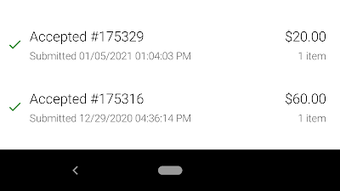
- Deposit History Tracking – Users can view a record of past deposits, including dates, amounts, and status, to help manage personal finances and verify transactions.
These features collectively enhance financial accessibility and reduce dependency on physical banking hours or locations. For example, a user receiving a monthly paycheck can deposit it immediately after receiving the paper check, without waiting for business hours. Similarly, individuals in rural or underserved areas can benefit from remote access to banking services.
User Interface, Workflow & Performance
DeposZip Mobile features a clean, intuitive user interface designed for ease of use across various Android devices. Navigation is straightforward, with key functions such as “Deposit Check” and “View History” clearly labeled and accessible from the main screen. The workflow is optimized to guide users step-by-step through the deposit process, from capturing the check image to final submission.
Users are prompted to align the check within a frame, adjust lighting, and ensure all information is legible. The app provides real-time feedback on image quality, helping to minimize errors and rejections. The overall workflow is efficient, typically requiring fewer than five steps to complete a deposit.
Performance observations are based on general software behavior patterns. The app is designed to operate smoothly on Android 5.0 and higher, though exact performance details were not specified. The developer did not provide additional system requirements or resource usage data. Stability is expected to be consistent, given the app’s focus on a single, well-defined function.
Compatibility & System Requirements
DeposZip Mobile is designed for Android operating systems, specifically requiring Android 5.0 or later for installation and operation. The app is not compatible with low-density display devices, which may affect usability on older or lower-end smartphones.
Installation size and hardware requirements were not specified. The developer did not provide detailed information about CPU, RAM, or storage needs. As such, exact system compatibility remains limited to the minimum OS version stated. Users should ensure their device meets the minimum Android version to use the app.
Platform compatibility information is limited to the OS and version. No additional compatibility details, such as support for tablets or wearables, were provided.
Pros and Cons
Pros
- Enables check deposits from anywhere using a smartphone camera
- Fast and secure deposit processing with real-time confirmation
- Intuitive interface suitable for users of all technical skill levels
- Helps reduce time spent on banking tasks and travel to branches
- Supports financial institutions that participate in the program
Cons
- Requires participation from the user’s financial institution to function
- Not compatible with low-density display devices
- Dependent on internet connectivity for submission and confirmation
- No public information about developer background or company
- Exact system resource usage details were not provided
FAQ Section
Is DeposZip Mobile available for all banks?
DeposZip Mobile is only available to customers of participating financial institutions. Users should confirm with their bank whether the service is supported.
Is the app secure for depositing checks?
Yes, the app uses secure transmission protocols to protect check images and financial data during transfer. All deposits are processed through encrypted channels.
Can I use DeposZip Mobile without an internet connection?
No, an active internet connection is required to capture, transmit, and confirm deposits. The app cannot function offline.
What Android versions are supported?
DeposZip Mobile requires Android 5.0 or higher. Devices running older versions are not compatible.
How do I update the app?
Updates are typically delivered through the Google Play Store. Users should ensure their device is connected to the internet and check for updates regularly.
Final Thoughts
DeposZip Mobile offers a practical and secure solution for users seeking to simplify their check deposit process. By leveraging smartphone cameras and secure digital transmission, the app brings banking convenience directly to the user’s hands. Its straightforward interface and reliable workflow make it an ideal tool for individuals who value efficiency and time savings.
While its functionality is limited to participating financial institutions, the app fills a critical gap for mobile banking users who want to avoid branch visits. The lack of detailed system requirements or developer information is a minor drawback, but does not significantly impact usability for eligible users.
For anyone looking to modernize their banking routine and manage finances on the go, DeposZip Mobile is a must-have tool. Download DeposZip Mobile now.







